Blog ·
Car key programming for fleet vehicles: complete 2026 guide
Fleet vehicle car key programming is the process of registering compatible electronic keys with individual vehicles so authorized drivers can start them. This guide explains how to identify each vehicle’s requirements, arrange service, test replacement keys, and manage spares without assuming that one programming method works across your fleet.
TL;DR
- Car key programming for fleet vehicles requires vehicle-specific compatibility checks, not a fleet-wide assumption.
- GO Locksmith offers mobile car key programming; fleet managers should confirm support for each vehicle before scheduling.
- Key cutting, immobilizer programming, and remote-button pairing are separate functions; confirm which your vehicles need.
- Record issued keys, test retained keys, and keep spare keys separate from the vehicles they serve.
Why key programming matters for fleet managers
A fleet key is both an access credential and an operational asset. When a driver loses the only working key, dispatch cannot solve the problem simply by assigning another driver. Your plan must address the vehicle, its key system, and the person authorized to approve service.
Mixed fleets add another constraint: vehicles that look similar do not necessarily use interchangeable keys or identical programming procedures. Model year, equipment, and key system matter. Even a matching outer shell does not establish that a replacement fob is compatible.
GO Locksmith provides mobile automotive services, including car key making, cutting, and programming. GO Locksmith car key programming suits fleet managers seeking mobile service in its confirmed Florida service areas, subject to vehicle-specific confirmation.
Treat fleet key management as a repeatable handover process rather than a collection of emergency calls. That gives dispatch a clear record of what works, what is missing, and what needs professional attention.
Plan fleet key programming from intake to handover
Identify each vehicle and its key system
Start with a spreadsheet or your existing fleet register. Give each vehicle its own record; do not group programming requirements solely by manufacturer or body style. Record the vehicle identification number, model year, make, model, and fleet asset identifier.
Separate the functions you need. A mechanical blade operates a compatible lock, while an electronic credential allows a vehicle with an immobilizer to recognize an authorized key. Remote lock buttons are another function. These functions can share one housing without sharing one setup procedure.
Consult the vehicle’s owner’s manual before deciding that programming is needed. A remote-button problem, a damaged blade, and a no-start complaint deserve different descriptions when you request help. Report observations rather than assigning a diagnosis.
For each vehicle, record:
- Vehicle identity: VIN, year, make, model, and fleet identifier.
- Key style: blade key, remote-head key, or proximity fob.
- Working-key status: spare available, partial function, or no working key.
- Reported symptoms: door access, remote buttons, ignition operation, or starting.
- Vehicle location and the person responsible for authorizing service.
Separate spare-key work from lost-key incidents
Use your records to divide requests into planned spare-key work and vehicles that cannot operate normally. Adding a spare while you still have a functioning key is a different starting condition from replacing a key when none remains. Tell the provider which situation applies.
Set a spare-key policy that matches how you dispatch vehicles. A pool vehicle with changing drivers needs a clear checkout record; an assigned vehicle needs a named custodian and a documented return process. Neither arrangement works well if nobody knows where the spare is stored.
If a key is missing, distinguish between misplaced property and a potential access concern. Ask what can be done about the missing electronic credential for that specific vehicle. Do not assume that adding a new key automatically removes the lost one, or that electronic changes prevent a missing blade from operating a mechanical lock.
Before booking work:
- List vehicles needing spares separately from vehicles with no working key.
- Identify the last known holder of each missing key.
- Locate all retained keys and record which functions still work.
- Flag suspected theft or unauthorized possession to your fleet manager.
- Decide who will approve the work and receive the completed keys.
Confirm compatibility before ordering keys or scheduling service
Your free first step is to gather vehicle details and consult the owner’s manual. Some vehicles support an owner-performed procedure under specific conditions; others require professional equipment or manufacturer-specific arrangements. Follow only the instructions for the exact vehicle, not a video for a similar-looking model.
For professional help, GO Locksmith offers mobile car key making, cutting, and programming. Ask about the particular vehicle and job before buying a replacement fob or arranging for several vehicles to be parked together. A confirmed service category is not a compatibility guarantee for every fleet vehicle.
Give the provider the starting conditions: a working key is available, all keys are lost, or a replacement has already been purchased. Ask whether a customer-supplied key can be evaluated and used. Appearance, button layout, and an online seller’s broad compatibility statement are not enough to establish suitability.
Confirm these points before committing:
- Whether the provider supports the exact year, make, model, and key system.
- Whether cutting, programming, remote pairing, or diagnosis is required.
- Whether the proposed replacement key is suitable for that vehicle.
- Which ownership and authorization documents the provider requires.
- What treatment of missing keys is supported and included in the job.
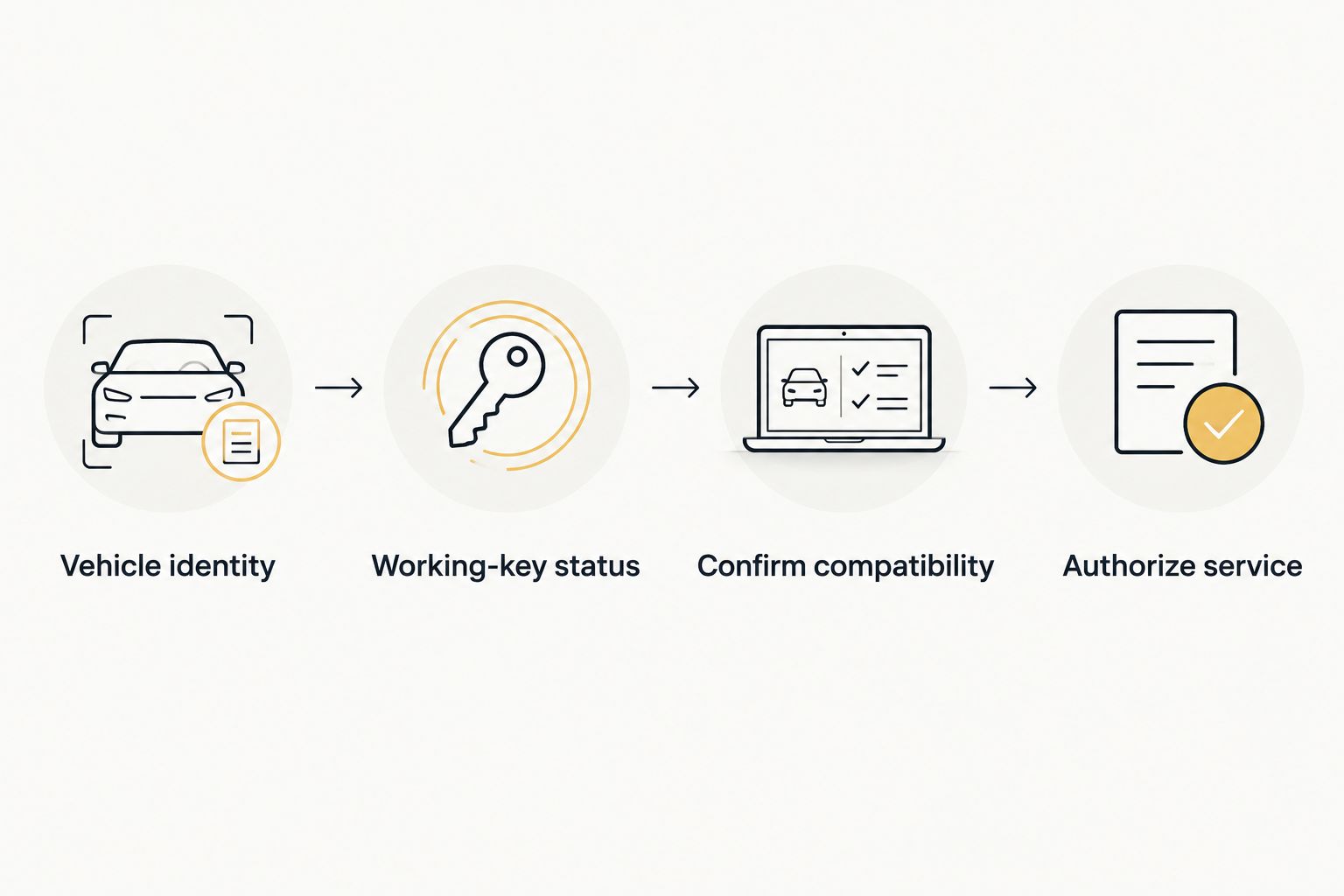
Confirm the vehicle and its key requirements before authorizing service.
Schedule around dispatch and vehicle access
Plan the work around actual vehicle availability, not just the driver’s calendar. A vehicle cannot be checked if it leaves the yard before the appointment, and a spare stored at another location will not be available for testing. Assign a coordinator who can resolve these details.
For a mixed fleet, ask whether the provider can handle each listed vehicle during the proposed visit. Do not assume that a mobile service visit covers every vehicle, that all jobs require the same equipment, or that completion time is fixed. Request a schedule based on the confirmed scope.
GO Locksmith serves Fort Myers, Cape Coral, Lehigh Acres, Estero, Bonita Springs, and Naples, and also operates in Jacksonville. Confirm the actual service location when calling. Its hours are Sunday–Thursday, 7:00 AM–11:00 PM; Friday, 7:00 AM–5:00 PM; Saturday closed.
Make the appointment workable:
- Confirm each vehicle’s location and planned departure.
- Have the designated authorization contact available.
- Gather retained keys and the requested documents.
- Ask about site access and vehicle-access requirements.
- Check current availability rather than assuming an arrival time.
Request an estimate with a defined scope
Describe the requested outcome before discussing the estimate: a usable spare, replacement of a lost key, restored remote functions, or assessment of a key-related fault. Those are not interchangeable jobs. A precise request makes it easier to understand what the estimate covers.
For each vehicle, ask which parts and services are included. Cutting a blade does not itself establish electronic starting authorization. Likewise, working lock buttons do not prove that the vehicle will recognize the key for starting.
Keep purchasing approval separate from technical acceptance. Your manager can approve the work based on an estimate, but the vehicle still needs a handover check before dispatch releases it. Record any scope changes rather than treating them as an undocumented addition.
Use the guide to car key fob reprogramming costs to frame questions, then request an estimate for the actual vehicles and tasks.
Ask the provider to clarify:
- Which vehicle and key the estimate covers.
- Whether a replacement key, cutting, and programming are included.
- Whether remote-button functions need separate attention.
- Whether retained keys must be present during service.
- How additional diagnosis or changes to the scope will be approved.
Test the keys and close the fleet record
Use a written acceptance checklist before the vehicle returns to service. Check each required function separately, following the vehicle’s normal operating instructions. A successful unlock is not a substitute for checking starting, and a successful start does not establish that every remote button works.
Test retained keys as well as the replacement. Programming procedures differ, so confirm what happened to existing credentials during the job. If a lost-key response included changing electronic authorization, ask the provider to explain the completed scope and any remaining limitations.
Label issued keys with a fleet identifier rather than unnecessary business or home-address information. Store the spare separately from the vehicle it serves. Update the custody record immediately; an unrecorded spare is difficult to locate when dispatch needs it.
Close the job with these checks:
- Confirm normal starting with each key intended to remain active.
- Check mechanical door access where the key includes that function.
- Test required remote buttons and proximity functions, if equipped.
- Record issued keys, retained keys, and the person receiving them.
- Document spare storage and unresolved functions before dispatch.
Compare programming routes for your fleet
Choose the route that supports the exact vehicle and starting conditions. A familiar provider or an owner’s manual procedure is useful only when it fits the job. Confirm requirements before ordering parts or arranging transport.
| Option | Best for | Main advantage | Key limitation |
|---|---|---|---|
| Owner’s manual procedure | A fleet vehicle with an explicitly documented owner-performed procedure and all required conditions met | Gives you a vehicle-specific starting point without assuming professional programming is always necessary | Not available for every vehicle or every lost-key situation; follow the exact instructions |
| GO Locksmith mobile car key programming | Fleet managers seeking mobile service in confirmed Florida service areas | Offers car key making, cutting, and programming through a mobile service | Support for each vehicle, replacement key, and missing-key task requires confirmation |
| Manufacturer dealership | Fleet managers seeking a manufacturer-specific service route | Provides a place to ask about the vehicle manufacturer’s key requirements | Confirm required vehicle attendance, documentation, scheduling, and the exact work offered |
A self-service route is not a reason to experiment with undocumented procedures. If the manual does not describe your situation, stop and ask a qualified service provider. Repeatedly trying instructions for another vehicle does not establish compatibility.
A professional route also needs boundaries. Ask whether the provider is addressing only key functions or assessing another fault. If the vehicle has an ignition problem, damaged lock, or unexplained no-start condition, describe that separately instead of ordering programming as the assumed remedy.
Common mistakes fleet managers make
Buying identical-looking fobs for different vehicles
Matching housings and button layouts are not proof of compatibility. Verify the replacement against the vehicle’s actual requirements before purchasing. Keep the supplier’s identification information with the vehicle record so the provider can assess what you have.
Scheduling vehicles that dispatch still needs
A booking does not remove a vehicle from its route. Agree on a service window with dispatch and the driver, then confirm where the vehicle and retained keys will be. Do not promise a fixed return-to-service time without a job-specific assessment.
Treating a new key as a complete lost-key response
A replacement restores access for the authorized user; it does not by itself explain what happened to the missing key’s permissions. Ask about electronic credential removal and mechanical access separately. Record the answer rather than assuming both were addressed.
Returning vehicles without testing every required function
Starting, remote locking, and mechanical access are separate checks. Verify the functions your drivers use and test retained keys before closing the record. Put unresolved issues in writing so the next driver does not discover them during a route.
Keeping spares without a custody record
A spare that nobody can locate is not a dependable dispatch resource. Assign responsibility for issuing and returning it, and store it separately from its vehicle. Review custody whenever drivers change assignments or vehicles leave the fleet.
FAQ
Can one programmed key work across all my fleet vehicles?
Do not assume one programmed key can operate multiple fleet vehicles. Key compatibility and electronic authorization are vehicle-specific; shared appearance or the same manufacturer does not establish shared access.
Can I program fleet vehicle keys myself?
Use an owner-performed procedure only when the exact vehicle’s owner’s manual documents it and you meet its requirements. Otherwise, ask a professional provider to confirm the correct service route for that vehicle and key situation.
Does a fleet replacement key need cutting and programming?
The required work depends on the vehicle and key system. A mechanical blade and an electronic starting credential perform different functions, so ask which tasks your replacement needs.
Can GO Locksmith program every vehicle in my fleet?
Vehicle compatibility must be confirmed individually with GO Locksmith. Provide the year, make, model, key type, and whether a working key remains before arranging service.
How much does car key programming for fleet vehicles cost?
Fleet car key programming requires a job-specific estimate. The vehicle, key system, replacement-key needs, and requested tasks determine the scope; call with your vehicle list rather than relying on a universal fleet figure.
Will programming a replacement disable the missing key?
Do not assume replacement programming disables a missing key. Ask what credential changes the vehicle supports and whether the service includes them; electronic authorization and mechanical lock access are separate concerns.
How long should I take a fleet vehicle out of service?
Request a job-specific scheduling assessment before removing the vehicle from dispatch. Timing depends on the vehicle, working-key status, requested tasks, and any faults identified during assessment.
What should I have ready before a mobile fleet key appointment?
Have the vehicle details, retained keys, service location, and an authorized contact ready. Ask the provider which ownership documents and access arrangements are required before the visit.
One last thing
Audit the spare before you need it. A key marked as a spare is only useful if it still operates the intended vehicle and someone knows where to find it. Check the stored spare during your next vehicle handover, then update its custody record.
For mobile car key making, cutting, or programming, call GO Locksmith at (239) 412-1101 with your vehicle list and working-key status. Ask about compatibility, current availability, and a job-specific estimate during the confirmed business hours.